User Guide#
This page presents the Python interface of ussa1976.
For details on how to use the command-line interface to ussa1976, refer
to the usage page.
Getting started#
Compute the U.S. Standard Atmosphere 1976 model:
import ussa1976

ds = ussa1976.compute()
The output is a Dataset object that tabulates the values of
the different atmospheric variables as a function of altitude.
By default, the U.S. Standard Atmosphere 1976 model is computed on a piece-wise linearly spaced altitude mesh, specified in the table below.
Altitude range |
Altitude step |
|---|---|
\([0, 11]\) km |
\(50\) m |
\([11, 32]\) km |
\(100\) m |
\([32, 50]\) km |
\(200\) m |
\([50, 100]\) km |
\(500\) m |
\([100, 300]\) km |
\(1000\) m |
\([300, 500]\) km |
\(2000\) m |
\([500, 1000]\) km |
\(5000\) m |
Inspect the output data set#
You can easily access the values of the different computed variables for further manipulation.
For example, pressure values can be accessed with:
ds["p"].values
Please refer to the xarray documentation for more details.
Plot a variable#
Note
The matplotlib library must be installed for plotting.
Plotting variables is made very convenient with xarray.
For example, the code below plots the pressure as a function of altitude:
import matplotlib.pyplot as plt

plt.figure(dpi=100)
ds.p.plot(y="z", xscale="log")
plt.grid()
plt.show()
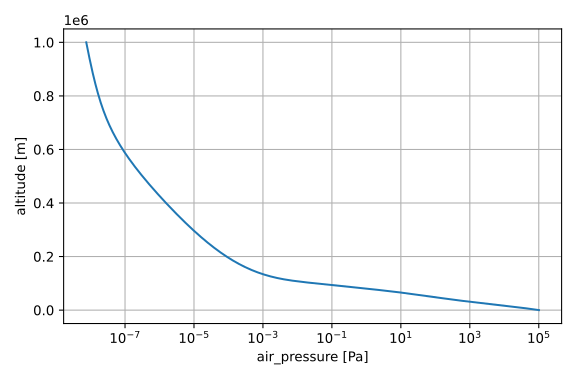
Please refer to the xarray documentation for more details.
Work with a custom altitude mesh#
You can compute the U.S. Standard Atmosphere 1976 model on any altitude mesh oy your liking as long as the altitude bounds are within \([0, 1000]\) km.
For example, you can compute the model on a regular altitude mesh between 0 kilometer and 100 kilometer with a 1-meter altitude step, with:
import numpy as np

ds = ussa1976.compute(z=np.arange(0.0, 100001.0, 1.0))
Note
Altitude units are meter.
Compute specific variables#
You might not be interested in computing all 14 variables of the U.S. Standard
Atmosphere 1976 model.
You can select only the variables that are relevant for your application using
the variables parameters.
For example, to compute only the air temperature (t), air pressure (p),
air number density (n_tot) and the species number density (n), use:
ds = ussa1976.compute(variables=["t", "p", "n_tot", "n"])
The table below indicates what symbol is used for each variable.
Symbol |
Variable name |
|---|---|
|
air temperature |
|
air pressure |
|
number density |
|
air number density |
|
air density |
|
air molar volume |
|
air pressure scale height |
|
air particles mean speed |
|
air particles mean free path |
|
air particles mean collision frequency |
|
speed of sound in air |
|
air dynamic viscosity |
|
air kinematic viscosity |
|
air thermal conductivity coefficient |
By default, all 14 variables are computed.